系列:從鐵人賽到 Agent Orchestration — AI 自動建立 .NET 測試的完整方案(9)
前言
前面三篇分別介紹了 Unit Test、Integration、Aspire 三個 Orchestrator。它們有一個共同點 — 都使用 xUnit 作為測試框架。而這篇要介紹的 TUnit Testing Orchestrator,是唯一一個使用完全不同測試框架的 Orchestrator。
TUnit Testing Orchestrator 是原本計畫中就要做的第四個 Orchestrator。架構上參考 Unit Test Orchestrator 的 1 + 4 Subagent 設計,流程與各個 Subagent 的內容則依據 dotnet-testing-agent-skills 中的 dotnet-testing-advanced-tunit-* 相關 Skills 來做設計。
TUnit 是一個基於 Source Generator 的新世代 .NET 測試框架。它跟 xUnit 的差異不只是 Attribute 名稱不同 — 從專案類型(OutputType=Exe)、執行方式(dotnet run)、方法簽章(必須 async Task)到套件引用(不需要 Microsoft.NET.Test.Sdk),幾乎每個面向都不一樣。這些根本性的差異,讓每個 Subagent 都需要針對 TUnit 框架重新設計。
TUnit 框架簡介
為什麼 TUnit 值得關注
TUnit 與傳統測試框架(xUnit、NUnit)的核心差異在於測試發現機制:
| 面向 | xUnit / NUnit | TUnit |
|---|---|---|
| 測試發現 | Runtime 反射 | Source Generator(編譯時期) |
| 執行方式 | dotnet test(VSTest) | dotnet run(Microsoft.Testing.Platform) |
| OutputType | Library | Exe |
| Test SDK | 需要 Microsoft.NET.Test.Sdk | 不需要 |
| 方法簽章 | void 或 Task | 必須 async Task |
| 平行執行 | 預設循序 | 預設平行 |
| AOT 支援 | 不支援 | 支援 |
Source Generator 帶來的好處是編譯時期就能發現測試,不需要 Runtime 反射,也天然支援 AOT。但代價是所有的 xUnit/NUnit 慣例都不再適用。
關鍵語法對照
| 功能 | xUnit | TUnit |
|---|---|---|
| 基本測試 | [Fact] | [Test] |
| 參數化測試 | [Theory] + [InlineData] | [Test] + [Arguments] |
| 方法資料來源 | [Theory] + [MemberData] | [Test] + [MethodDataSource] |
| 類別資料來源 | [Theory] + [ClassData] | [Test] + [ClassDataSource] |
| 跳過測試 | [Fact(Skip = "...")] | [Test, Skip("...")] |
| 重試 | — | [Test, Retry(3)] |
| Timeout | — | [Test, Timeout(5000)] |
| 循序執行 | [Collection("Sequential")] | [Test, NotInParallel] |
| 生命週期 | Constructor / IDisposable | [Before(Test)] / [After(Test)] |
csproj 配置差異
<!-- ❌ xUnit 專案 -->
<PropertyGroup>
  <TargetFramework>net9.0</TargetFramework>
</PropertyGroup>
<ItemGroup>
  <PackageReference Include="xunit" Version="2.9.2" />
  <PackageReference Include="Microsoft.NET.Test.Sdk" Version="17.12.0" />
</ItemGroup>

<!-- ✅ TUnit 專案 -->
<PropertyGroup>
  <TargetFramework>net9.0</TargetFramework>
  <OutputType>Exe</OutputType>        <!-- 必須 -->
  <LangVersion>latest</LangVersion>
</PropertyGroup>
<ItemGroup>
  <PackageReference Include="TUnit" Version="0.6.123" />
  <!-- 不需要 Microsoft.NET.Test.Sdk -->
</ItemGroup>
TUnit Orchestrator 架構
5 個專屬 Agent 定義檔
5 個 Agent 定義檔都放在 .github/agents/ 目錄下:
.github/agents/
├── dotnet-testing-advanced-tunit-orchestrator.agent.md
├── dotnet-testing-advanced-tunit-analyzer.agent.md
├── dotnet-testing-advanced-tunit-writer.agent.md
├── dotnet-testing-advanced-tunit-executor.agent.md
└── dotnet-testing-advanced-tunit-reviewer.agent.md
Writer 使用的 TUnit Skills
TUnit Writer 透過 mcp-local-rag 語意查詢取得 2 個 TUnit 測試專屬的 Skills,採用「必載 + 條件載入」策略:
| Skill | 載入策略 | 內容 |
|---|---|---|
dotnet-testing-advanced-tunit-fundamentals | 必載 | 基礎語法、Attribute 對照、csproj 配置、執行方式 |
dotnet-testing-advanced-tunit-advanced | 條件載入 | MethodDataSource、DI、Retry、ASP.NET 整合 |
dotnet-testing-advanced-tunit-advanced 在以下情況才會載入:
- 需要
MethodDataSource/ClassDataSource/ Matrix 測試 - 需要 DI 容器注入
- 需要 Retry / Timeout
- 需要 Properties 過濾
- 需要 ASP.NET Core 整合測試
- 需要 Testcontainers 多容器協調
- 從 xUnit/NUnit 遷移且涉及進階功能
JSON 交接機制
v2.0.0 引入了結構化 JSON 交接機制,各 Subagent 的中間結果不再透過 prompt 傳遞,而是寫入本地檔案,下游 Subagent 直接讀檔:
.orchestrator/{ClassName}/
├── analyzer-result.json   # Analyzer 的分析報告
├── writer-result.json     # Writer 的輸出摘要
└── executor-result.json   # Executor 的執行結果
這讓每個階段的 prompt 保持精簡,不會因為 handoff 文字累積而膨脹。
Phase Timing
v2.0.0 在 TUnit Orchestrator 中內建了階段耗時記錄,每次完整流程結束後會輸出 tunit-orchestrator-timing.log,顯示各階段耗時:
Phase 1 (Analyzer):  xx 秒
Phase 2 (Writer):    xx 秒
Phase 3 (Executor):  xx 秒
Phase 4 (Reviewer):  xx 秒
─────────────────────
Total:               x 分 xx 秒
四個 Subagent 的差異比較
Analyzer 差異 — 框架類型偵測
TUnit Analyzer 比其他 Analyzer 多了一個關鍵步驟:偵測測試專案的框架類型。
| 偵測結果 | 條件 | 後續處理 |
|---|---|---|
new | 測試 .csproj 中沒有 TUnit/xUnit/NUnit | 全新建立 TUnit 測試專案 |
xunit | 測試 .csproj 中有 xUnit 套件引用 | xUnit → TUnit 遷移 |
nunit | 測試 .csproj 中有 NUnit 套件引用 | NUnit → TUnit 遷移 |
tunit | 測試 .csproj 中已有 TUnit 套件引用 | 在既有 TUnit 專案中新增測試 |
TUnit 特有的功能需求分析
除了標準的依賴分析外,TUnit Analyzer 會評估 9 個 TUnit 特有的功能需求旗標:
{
  "tunitFeatureRequirements": {
    "basicTest": true,
    "arguments": true,
    "methodDataSource": false,
    "classDataSource": false,
    "matrixTests": false,
    "dependencyInjection": false,
    "notInParallel": false,
    "retry": false,
    "timeout": false
  }
}
這些旗標決定了 Writer 是否需要載入 tunit-advanced Skill。
Matrix 測試候選識別
Analyzer 會識別「適合用多維組合測試」的方法 — 例如一個方法接受顧客等級和訂單金額兩個參數,兩者的排列組合就是 Matrix 測試的好候選人。
值得注意的是,TUnit 0.6.123 中 [MatrixDataSource] 和 [Matrix] 不存在。Writer 需要用 [MethodDataSource] 配合巢狀迴圈來模擬 Matrix 測試行為。
遷移分析
當偵測到 xUnit → TUnit 遷移時,Analyzer 會額外產出 migrationAnalysis,包含:
- Attribute 轉換:
[Fact]→[Test]、[InlineData]→[Arguments] - 簽章轉換:
void→async Task、Task→async Task - 生命週期轉換:Constructor →
[Before(Test)]、IDisposable.Dispose→[After(Test)]
Writer 差異 — csproj 配置與 TUnit 語法
TUnit Writer 面對的最大挑戰不是測試邏輯,而是專案配置和語法正確性。一個配置錯誤(例如忘了設 OutputType=Exe),整個測試就跑不起來。
嚴格禁止清單
Writer 有一份嚴格的禁止清單,任何違反都會導致測試無法執行:
- ❌
Microsoft.NET.Test.Sdk— TUnit 不需要,引用了反而會衝突 - ❌ xUnit 任何套件 — 不能混用框架
- ❌
<OutputType>Library</OutputType>— 必須是Exe - ❌
void測試方法 — 必須是async Task - ❌
[Fact]、[Theory]、[InlineData]— 必須用 TUnit 對應 Attribute
方法簽章規則
所有 TUnit 測試方法必須是 async Task,這是 xUnit 開發者最容易忘記的點:
// ✅ TUnit 正確寫法
[Test]
public async Task ValidateISBN_有效ISBN13_應回傳True()
{
    var result = BookCatalog.ValidateISBN("978-3-16-148410-0");
    result.Should().BeTrue();
}

// ❌ 錯誤:void 方法
[Test]
public void ValidateISBN_有效ISBN13_應回傳True() { }

// ❌ 錯誤:非 async 的 Task
[Test]
public Task ValidateISBN_有效ISBN13_應回傳True() { }
生命週期管理
TUnit 不使用 Constructor / IDisposable,而是用 Attribute 標記:
public class BookCatalogTests
{
    private BookCatalog _sut;

    [Before(Test)]
    public async Task Setup()
    {
        _sut = new BookCatalog();
    }

    [After(Test)]
    public async Task Cleanup()
    {
        // 清理資源
    }

    [Test]
    public async Task ValidateISBN_空字串_應回傳False()
    {
        var result = _sut.ValidateISBN("");
        result.Should().BeFalse();
    }
}
版本相依鏈
TUnit 有嚴格的版本相依關係,Writer 必須遵守:
TUnit 0.6.123
    ↓ 依賴
Microsoft.Testing.Platform (1.8.x)
    ↑ 被依賴
├── Microsoft.Testing.Extensions.CodeCoverage → max 18.0.6
└── Microsoft.Testing.Extensions.TrxReport → max 1.8.5
必須避免使用 2.0.x+ 的 Testing Platform Extensions,否則會導致版本衝突。
Executor 差異 — dotnet run 執行
TUnit Executor 最核心的差異:使用 dotnet run,不是 dotnet test。執行完成後,Executor 會將結果寫入 .orchestrator/{ClassName}/executor-result.json,供 Reviewer 讀取最新測試執行狀態。
# ✅ TUnit 正確執行方式
dotnet run --project tests/Practice.TUnit.Core.Tests/

# ⚠️ 備選方案(部分場景可用)
dotnet test tests/Practice.TUnit.Core.Tests/
Source Generator 建置開銷
TUnit 基於 Source Generator,第一次建置時會有額外的編譯開銷(Source Generator 需要分析所有測試方法並產生對應的 Runner 程式碼)。後續的增量建置會快很多。
TUnit 輸出格式
TUnit 的測試輸出格式與 xUnit 不同,Executor 需要正確解析:
✓ ValidateISBN_有效ISBN13_應回傳True (12ms)
✓ ValidateISBN_空字串_應回傳False (3ms)
x CalculatePrice_負數折扣_應拋出ArgumentException (45ms)
↓ ImportFromCsv_大量資料_應在時限內完成 [Skipped]✓= 通過x= 失敗↓= 跳過
Reviewer 差異 — 七維度審查 + TUnit Compliance
TUnit Reviewer 在標準的六維度審查基礎上,新增了 TUnit Compliance 維度,總共七個維度:
- 命名品質 — 中文三段式命名
- 斷言品質 — AwesomeAssertions(與其他 Orchestrator 一致)
- 測試結構 — 組織架構
- TUnit Compliance — 新增
- 資料驅動 — Arguments、MethodDataSource
- 平行控制 — NotInParallel
- 覆蓋率 — 方法覆蓋
TUnit Compliance 零容忍檢查
Reviewer 對以下項目採取零容忍政策:
| 檢查項目 | 預期 | 零容忍 |
|---|---|---|
OutputType 為 Exe | ✅ | 是 |
無 Microsoft.NET.Test.Sdk | ✅ | 是 |
所有方法 async Task | ✅ | 是 |
使用 [Test](非 [Fact]) | ✅ | 是 |
| 無 xUnit 殘留 | ✅ | 是 |
只要有任何一項不通過,Reviewer 會直接在報告中標記為嚴重問題。
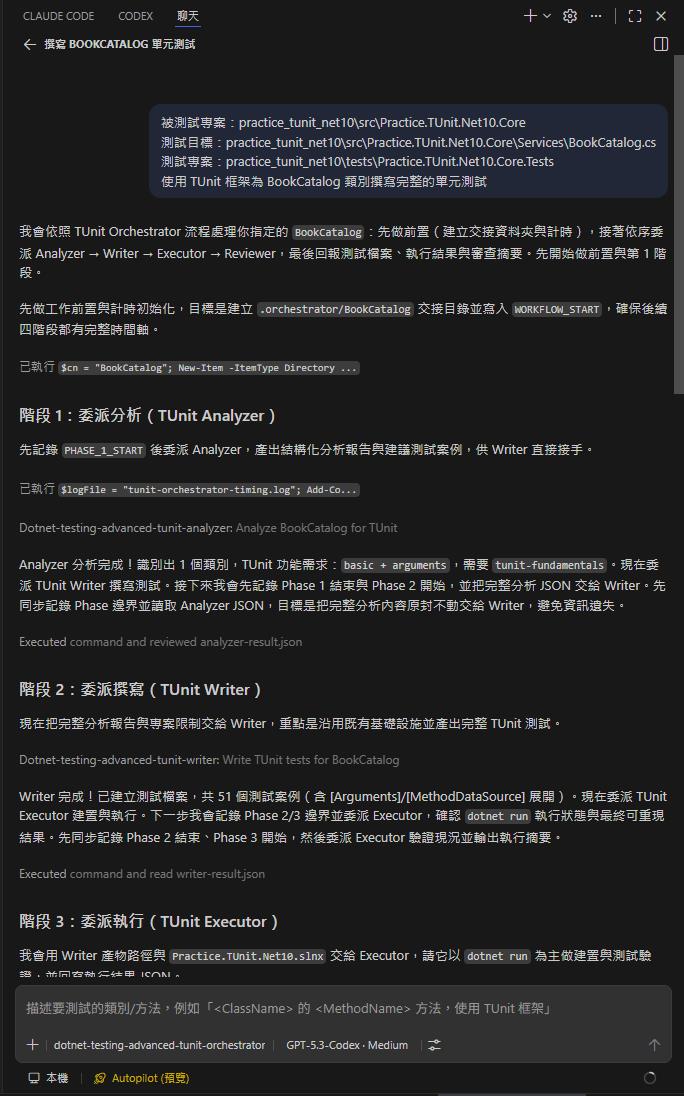
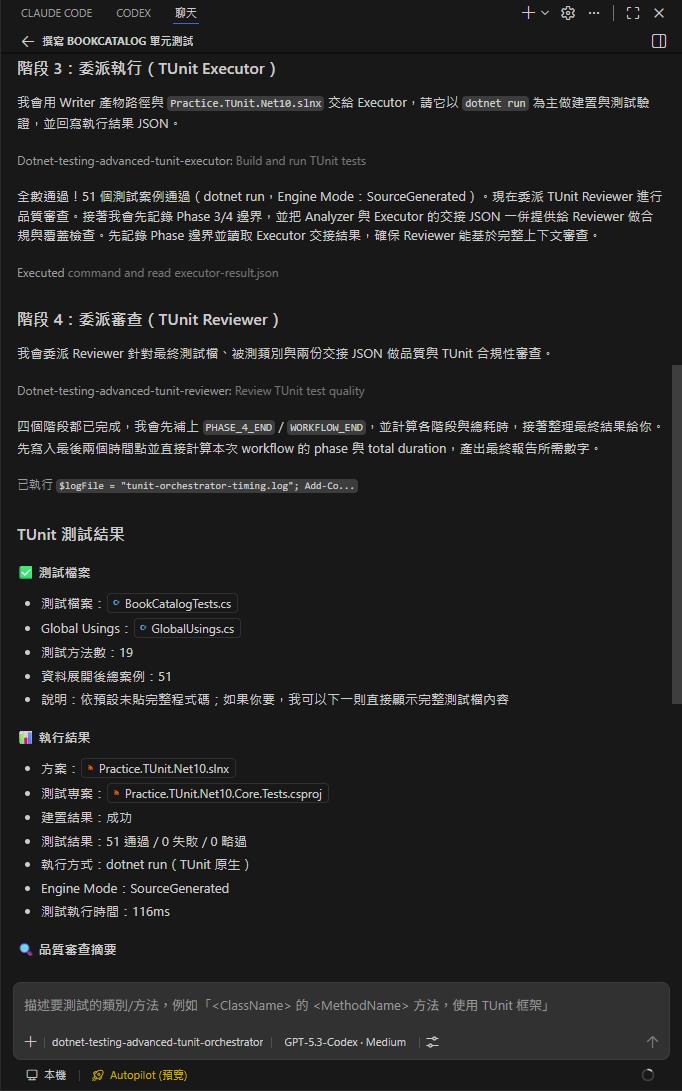
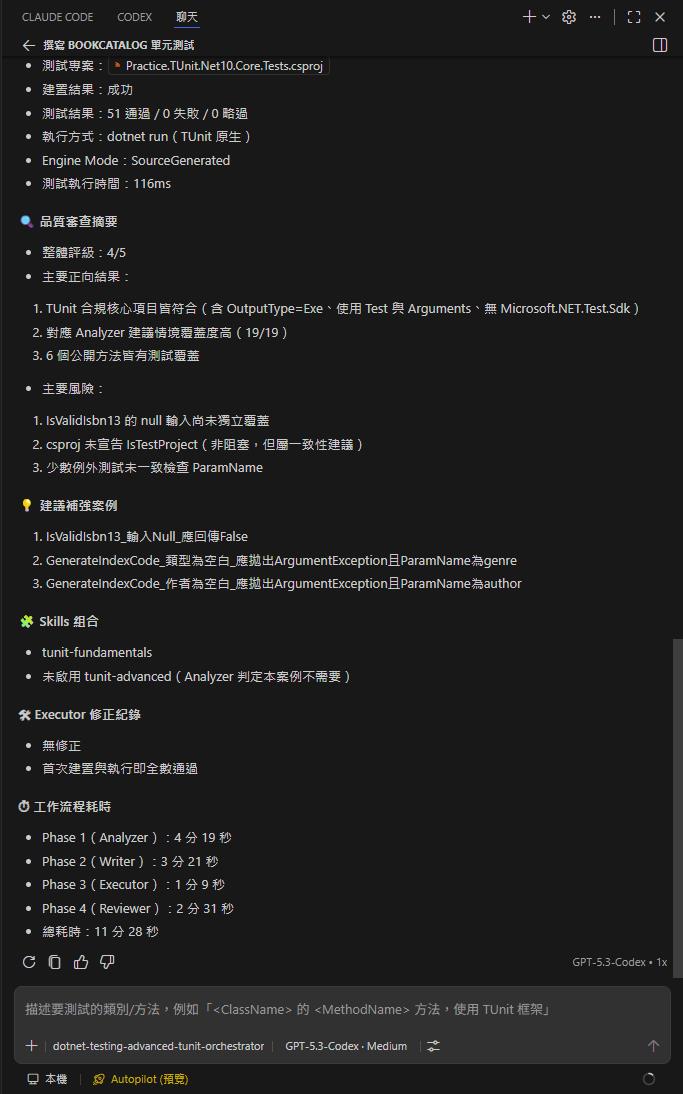
dotnet-testing-advanced-tunit-orchestrator - 執行狀態
以下是有開啟 dotnet-testing-skills MCP (mcp-local-rag) 的執行結果
四個 Orchestrator 完整對比
| 面向 | Unit Test | Integration | Aspire | TUnit |
|---|---|---|---|---|
| 測試框架 | xUnit | xUnit | xUnit | TUnit |
| Agent 定義檔 | 5 個 | 5 個 | 5 個 | 5 個 |
| Skills 數 | 29 個(透過 mcp-local-rag 查詢) | 4 個(透過 mcp-local-rag 查詢) | 1 個(透過 mcp-local-rag 查詢) | 1-2 個(透過 mcp-local-rag 查詢) |
| OutputType | Library | Library | Library | Exe |
| 執行方式 | dotnet test | dotnet test | dotnet test | dotnet run |
| Docker 需求 | 不需要 | 需要 | 需要 | 不需要 |
| Executor 環境檢查 | — | Docker | Docker + Aspire workload | — |
| 方法簽章 | void / Task | void / Task | void / Task | async Task(必要) |
| 遷移支援 | — | — | — | xUnit/NUnit → TUnit |
小結
TUnit Orchestrator 是四個 Orchestrator 中最「顛覆性」的一個。其他三個 Orchestrator 面對的差異主要在「測什麼」(Class vs API vs 分散式系統),但底層都用 xUnit。TUnit Orchestrator 面對的差異則是「用什麼測」— 一個完全不同的測試框架,從專案結構到執行方式都需要重新適配。
最大的收穫是,1 + 4 Subagent 架構再一次證明了它的「模板化」能力。即使是如此根本的框架差異,只需要調整每個 Subagent 的領域知識,架構本身不需要改變。這也是為什麼我能在相對短的時間內完成四個 Orchestrator — 第一個花了最多時間建立架構,後面三個都是在同一個框架上套用不同的領域知識。
到這裡,四個 Orchestrator 全部介紹完畢。下一篇是使用指南 — 從環境設定到實際操作,讓你可以在自己的專案中使用這些 Orchestrator。
參考資源
- dotnet-testing-agent-orchestration:https://github.com/kevintsengtw/dotnet-testing-agent-orchestration
- TUnit Orchestrator 設計文件:https://github.com/kevintsengtw/dotnet-testing-agent-orchestration/blob/main/docs/agent_orchestration/dotnet-testing-advanced-tunit-orchestrator.md
- TUnit 測試操作指南:https://github.com/kevintsengtw/dotnet-testing-agent-orchestration/blob/main/docs/agent_orchestration/practice-guide-tunit-testing.md
- TUnit 測試驗證專案:https://github.com/kevintsengtw/dotnet-testing-agent-orchestration/tree/main/samples/practice_tunit
- dotnet-testing-agent-skills:https://github.com/kevintsengtw/dotnet-testing-agent-skills
- TUnit 官方文件:https://thomhurst.github.io/TUnit/
純粹是在寫興趣的,用寫程式、寫文章來抒解工作壓力