[C#]字串更換
修改字串,有很多種方法,在HOW TO:修改字串內容 (C# 程式設計手冊)
裡面有一個範例,主要因為字串是不可變動,所以將字串放入可變動的字元陣列中,來做修改。
            char[] tmp = content.ToCharArray();
            int errorWordIndex = content.IndexOf("are");
            if (errorWordIndex == -1)
            {
                Console.WriteLine(content);
                return;
            }

            tmp[errorWordIndex++] = 'i';
            tmp[errorWordIndex++] = 's';
            tmp[errorWordIndex] = ' ';

            string newContent = new string(tmp);
            Console.WriteLine(newContent);
Output :
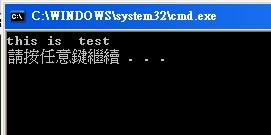
不過在這個方法中,我遇到一個問題,當變動字跟原先字的字數不一樣時,這樣就會多一個空白。
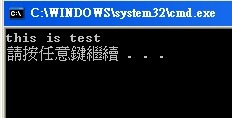
如果可以先將要變動的字串移除,在將更換的字串新增到同一個起始索引位置,一樣運用字串為字元集合的特性,再搭配String.Insert() ,String.Remove ()方法,
這邊一樣要注意到,方法的例外狀況,索引值不得小於零,索引值加移除字串長度不能超過原先字串的長度。
            string replaceWord = "are";
            string newWord = "is";
            string correctContent = string.Empty;

            int index = content.IndexOf(replaceWord);

            correctContent = content.Remove(index, replaceWord.Length);

            correctContent = correctContent.Insert(index, newWord);

            Console.WriteLine(correctContent);
Output :
在C#中,可以使用String.Replace()來替換字元或字串。
            string replaceWord = "are";
            string newWord = "is";
            string correctContent = content.Replace(replaceWord, newWord);
            Console.WriteLine(correctContent);
Output :
原先認為這應該不用做筆記,字串更換不就都是用String.Replace()這個方法,但這方法有一些需注意的地方。
            string replaceWord = string.Empty;
            string newWord = "is";
            string correctContent = content.Replace(replaceWord, newWord);
            Console.WriteLine(correctContent);
Output :

主要原因參考MSDN,開宗明義就講明,不能放入Null和空字串。
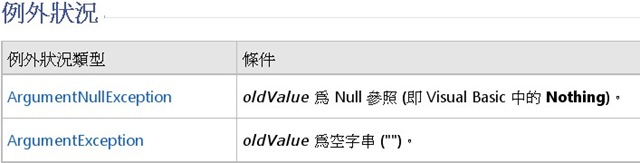
因此自己寫一個MyReplace,來處理這個問題,
        {
            if (string.IsNullOrEmpty(oldString))
                return vaule;
            else
                return vaule.Replace(oldString, newString);
        }
在vb中,還有提供不區分大小寫,但在c#中沒有此功能,因此多載上面的MyReplace。
這邊有幾種作法,
1.使用vb的函式庫
2.使用System.Text.RegularExpressions
3.自己打造一個
這邊使用RegularExpressions
        {
            if (IgnoreCase)
 	return Regex.Replace(vaule, oldString, newString, RegexOptions.IgnoreCase);
            else
   	return vaule.MyReplace(oldString, newString);

        }
接著將它合併與簡化。
        {
            if (string.IsNullOrEmpty(oldString) || IgnoreCase)
                return Regex.Replace(vaule, oldString, newString, RegexOptions.IgnoreCase);
            else
                return vaule.Replace(oldString, newString);
        }
結論:
在撰寫這篇筆記時,自己不斷問自己,為什麼不直接都用System.Text.RegularExpressions,似乎在資源與效能上有差異,因此在撰寫這個擴充方法時,為了就是殺雞不用牛刀,或許有更好的寫法,另外,在第一個範例,也充滿的懷疑,在msdn How to系列,有這樣的範例,應該有它的道理,因為真的不怎麼好用,只能推測,我功力又不到家了,不懂這樣寫法,或者這邊主要就是要再次提醒,字串的不可變動。
MSDN Library Reference :
Reference :
如文章有錯誤,煩請告知,新人發帖請多包涵
